Time Zone Meeting Planner

Compare a meeting time across common world time zones using browser time-zone data.

Results will appear here.
Calculation details
Every figure above is calculated locally in your browser from the assumptions shown. No inputs are sent anywhere. See the methodology section below for the formulas used.
Use this resultShare the current inputs, or ask ChatGPT to explain the calculation in context.
Ask an AI to explain this result
Share this result

Date and time results depend on your browser time-zone data and selected inputs. Time-zone laws can change; verify critical schedules with participants.

This tool runs in your browser. Your calculator inputs and results are never transmitted to us or to ad/affiliate partners. Ads and sponsored links may set third-party cookies to serve and measure them, but they never receive your calculation values. If you explicitly save a scenario, its permitted fields stay in local browser storage until you clear them. See our Privacy Policy.

Use this result

Share the current inputs or ask ChatGPT to explain the calculation in context.

More options
Report a calculation issue
Direct answer

What does this calculator estimate?

A 3:00 PM New York meeting shows as 12:00 PM in Los Angeles and 8:00 PM in London during summer. IANA zone offsets handle daylight saving automatically.

  • New York is UTC-4 in summer (EDT); Los Angeles is UTC-7 (PDT) (Wikipedia).
  • IANA time zones encode the daylight-saving rules for each region.
  • Daylight saving changes offsets twice a year in most US zones.

How meeting planning across zones works

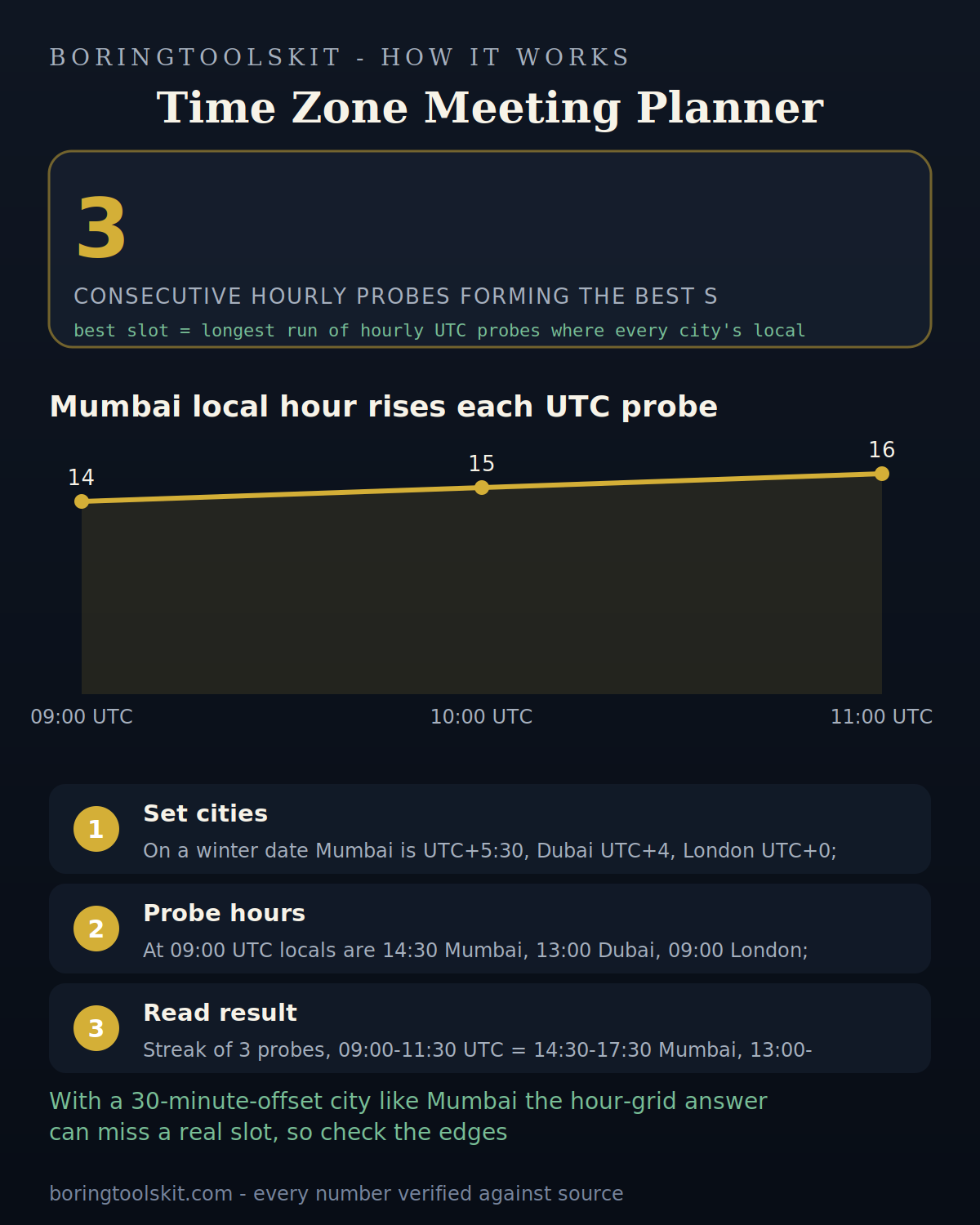
The planner takes the organizer's chosen time and renders it in each participant's zone using their current UTC offsets — daylight saving included. It converts the instant, not the clock, so everyone sees the same moment in local time.

Limitations to watch for

DST transitions differ by country — a time during a spring-forward gap resolves to the nearest valid offset. Confusingly, some zones don't observe DST. Always confirm participants' zones, especially for international teams.

How to use it in practice

List the zones, pick a candidate time, and check everyone's local hour. Aim for an overlap inside typical working hours. Double-check around DST change weekends. Send the invite with each person's local time confirmed.

["Add the participants' zones.", 'Choose the meeting date and time.', "Read each zone's local time."]

What the planner does

The planner shows a proposed meeting time across multiple time zones simultaneously, applying current offsets and daylight-saving rules. It answers the 'what time is it for them?' question for every participant at once.

DST differences

Time zones shift with daylight saving on different dates: when the US springs forward, a 3 PM New York call may be 8 PM London one week and 7 PM the next. The planner applies current rules so the comparison is correct today.

A worked example

A 9 AM Pacific meeting is noon Eastern, 5 PM London, and 6 PM Berlin (summer). The planner shows all of them at once so the invite time is right for everyone.

Working hours windows

The best time often overlaps the fewest working hours: 9–11 AM Pacific covers the US and Europe afternoon. The planner's simultaneous view makes the overlap visible.

Pairing with the world clock

The world clock shows current times; the planner schedules a specific meeting. Both use the same zone data, so the numbers always agree.

Transparent methodology

How this calculator works

Reviewed 2026-08-25 · BoringToolsKit Editorial Team

Formula

Converts a meeting time in the organizer's zone to each participant's local time using IANA zone offsets, handling daylight saving automatically.

Worked example

A 3:00 PM New York meeting shows as 12:00 PM in Los Angeles and 8:00 PM in London (summer).

Assumptions to verify

  • IANA zone names are used.
  • DST rules apply for the meeting date.
  • The chosen time is the organizer's local time.

Frequently asked questions

How do I plan a meeting across time zones?

Enter each participant's zone and the proposed time — the planner shows everyone's local time.

Does it handle daylight saving?

Yes — it applies each zone's DST rules for the specific date.

What's the best time for a global team?

Convert everyone's working hours to UTC and find the overlap — typically mornings in the Americas or afternoons in Europe.

Why do some zones not change for DST?

Arizona (most of it), Hawaii, and many countries don't observe DST — the planner knows.

What happens during spring-forward?

A nonexistent local time (2:00–3:00 AM) resolves to the nearest valid offset.

How is this different from the timezone converter?

The planner handles many zones at once — the converter does one pair.

Does it send invites?

No — it computes the times; you create the invite with the results.

What is the best time for a global call?

The overlap of working hours — often early morning Pacific / late afternoon Europe.

Is it the same as a world clock?

The world clock shows now; the planner schedules a specific time.

Cite this tool

BoringToolsKit. “Time Zone Meeting Planner.” boringtoolskit.com/time-zone-meeting-planner/ (reviewed 2026-08-25). Free to reference in articles, syllabi, and answer posts with a link.

Privacy: Inputs and results stay in this browser. Any future sponsored recommendation or advertisement will be clearly labeled and kept separate from the calculation.