Updates automatically as you type.
Calculated in your browser; your inputs are not sent to us. Privacy
Calculation details
Review the generated output before relying on it.
This tool runs in your browser. Your calculator inputs and results are never transmitted to us or to ad/affiliate partners. Ads and sponsored links may set third-party cookies to serve and measure them, but they never receive your calculation values. If you explicitly save a scenario, its permitted fields stay in local browser storage until you clear them. See our Privacy Policy.
Use this result
Share the current inputs or ask ChatGPT to explain the calculation in context.
More options
What does this calculator estimate?
Credit utilization calculator: compute your per-card and overall utilization ratio from balances and limits. Free, private, runs locally in your browser.
Your statement date decides what the bureaus can see
Credit utilization is measured at specific moments, not reviewed continuously. Most card issuers report the statement closing balance to the credit bureaus once a month, usually a day or two after your statement closes. That single reported number becomes the utilization figure the scoring models see for that account. If you make a large purchase the day before the statement closes, no matter how quickly you plan to pay it down, that purchase is what gets reported, even if your intention was to pay it immediately. This timing effect is one of the reasons a card you pay diligently still shows a high utilization percentage.
The calculator assumes you enter the balance that would be reported, which for most people is the statement closing balance, not the current balance on the last day of the month. If you do not know when your statement closes, check the closing date printed on any recent monthly statement. Some people deliberately time a large payment to land a few days before the closing date in order to keep the reported balance low. That timing tactic is banked and legal, and it works precisely because the reporting is a snapshot rather than a running average. The calculator's output tells you what utilization your snapshot shows if you entered the reported balance, and what it would show after a specific paydown. It cannot tell you whether your issuer reports on a different cadence, and some do; a small minority of issuers report mid-cycle rather than at statement close.
Per-card utilization and overall utilization are scored differently
The calculator computes both an overall ratio and per-card ratios if you enter multiple accounts, because scoring models generally look at two utilization figures separately: the utilization on each individual card and the total across all revolving accounts. So a person with one card at $4,500 on a $5,000 limit (90 percent) and another at $0 on a $15,000 limit can have the same overall ratio (22.5 percent) as a person with four cards each sitting nicely at 22 or 23 percent, but a very different per-card high. Both figures can influence scoring.
This is why a single big payment is sometimes less useful than a spread. Paying down the single over-limit card lowers the per-card high even faster than lowering the overall ratio, and the calculator highlights the card with the highest individual ratio precisely so you can decide which accounts to pay first rather than paying in an arbitrary order. If you have more than four accounts, entering them all matters; leaving a high-utilization card out of the inputs makes the overall figure look cleaner than your actual reporting shows. There is also a distinction the calculator cannot model: utilization on a card that has been recently opened or that has never been used at all carries different weight than utilization on an established card with a longer history. The tool shows the ratios; it does not weight them by account age the way a full scoring model would.
Why raising a limit is a faster fix than a payment you cannot afford
Lowering utilization has two knobs: pay down the balance, or increase the credit limit. The calculator lets you test the second knob directly, and it is worth understanding because it often moves the number further per dollar than the first. A person with a $6,200 balance on a $10,000 limit is at 62 percent. Paying off $2,000 moves them to 42 percent. If instead the issuer raises the limit to $16,000 with no payment, the ratio drops to about 39 percent with no cash out of pocket. Neither option is better in all cases; raising the limit requires issuer approval and a credit check, and some people should not take the hard inquiry.
The calculation itself is a single division: balance divided by limit, expressed as a percentage. The reason it matters is that both major scoring models treat the ratio as a strong factor, and a reported number above roughly 30 percent is widely associated with a negative effect independent of payment history. But that threshold is a rule of thumb derived from scoring behavior, not a formula the calculator endorses. The useful output of the calculator is not a target number, it is the set of ways your current snapshot could change: a $500 payment on one high ratio card, a $2,000 credit line increase on another, or a balance transfer onto a new card with a high limit. Each produces a different utilization table, and comparing the tables is the deliberate move, not guessing.
Where this calculator stops matching your real credit profile
The biggest limitation is that the calculator is a ratio tool, not a score predictor. It shows you what your utilization percentage is and what it would be after specific changes. What it does not compute is the score result, because the score depends on payment history, length of credit history, recent inquiries, credit mix, and dozens of modeling variables that no calculator can reproduce from a handful of balance figures. People sometimes run a scenario here, apply for a new credit card expecting the score to move, and are surprised that the score shifted by a different amount or direction than they expected. That surprise is not an error in the ratio math; it is the difference between a component and the whole score.
There is also a data problem. The balances the bureaus see are the reported balances, not your actual current balances, and issuers report at different times of the month. If you enter current balances from a banking app rather than statement balances, the calculator will produce a ratio that looks lower than what the bureaus recorded. The best inputs are statement balances, which appear on your monthly statements. The calculator also does not handle certain exotic account structures: business credit cards, charge cards that must be paid in full each month, authorized user accounts where you did not take on the original debt, or lines of credit that are not revolving. None of those are closed issues; they are exactly the accounts where the ratio and the reporting can diverge from what this simple division implies. When that happens, the honest answer is that the calculator is a planning tool, not a measurement of a live report.
How this calculator works
Assumptions to verify
- Balances are taken as you enter them. Card issuers report the statement balance to the bureaus, so a payment made before the statement closes will not lower the reported figure.
- Utilisation is computed per card and overall. Scoring models weigh both, so a single maxed card can hurt even when your total utilisation looks low.
- Limits are treated as the current approved credit line. A temporary limit increase or a pending charge that has not posted will change the ratio.
- This is arithmetic on your inputs, not a score. Utilisation is one input among several and this tool does not estimate a credit score.
Cite this tool
BoringToolsKit. “Credit Utilization Calculator.” boringtoolskit.com/credit-utilization-calculator/. Free to reference in articles, syllabi, and answer posts with a link.
Privacy: Inputs and results stay in this browser. Any future sponsored recommendation or advertisement will be clearly labeled and kept separate from the calculation.
$2,400 across $10k limits
What this means for your numbers: The worked example's 24% overall is fine, but per-card matters: any single card above 50% drags the score even at a good average. Pay before statement close to report lower.
Illustrative breakdown using the worked example above. The calculator computes your own numbers with the same formula.
Worked example: reading the ratio behind the verdict
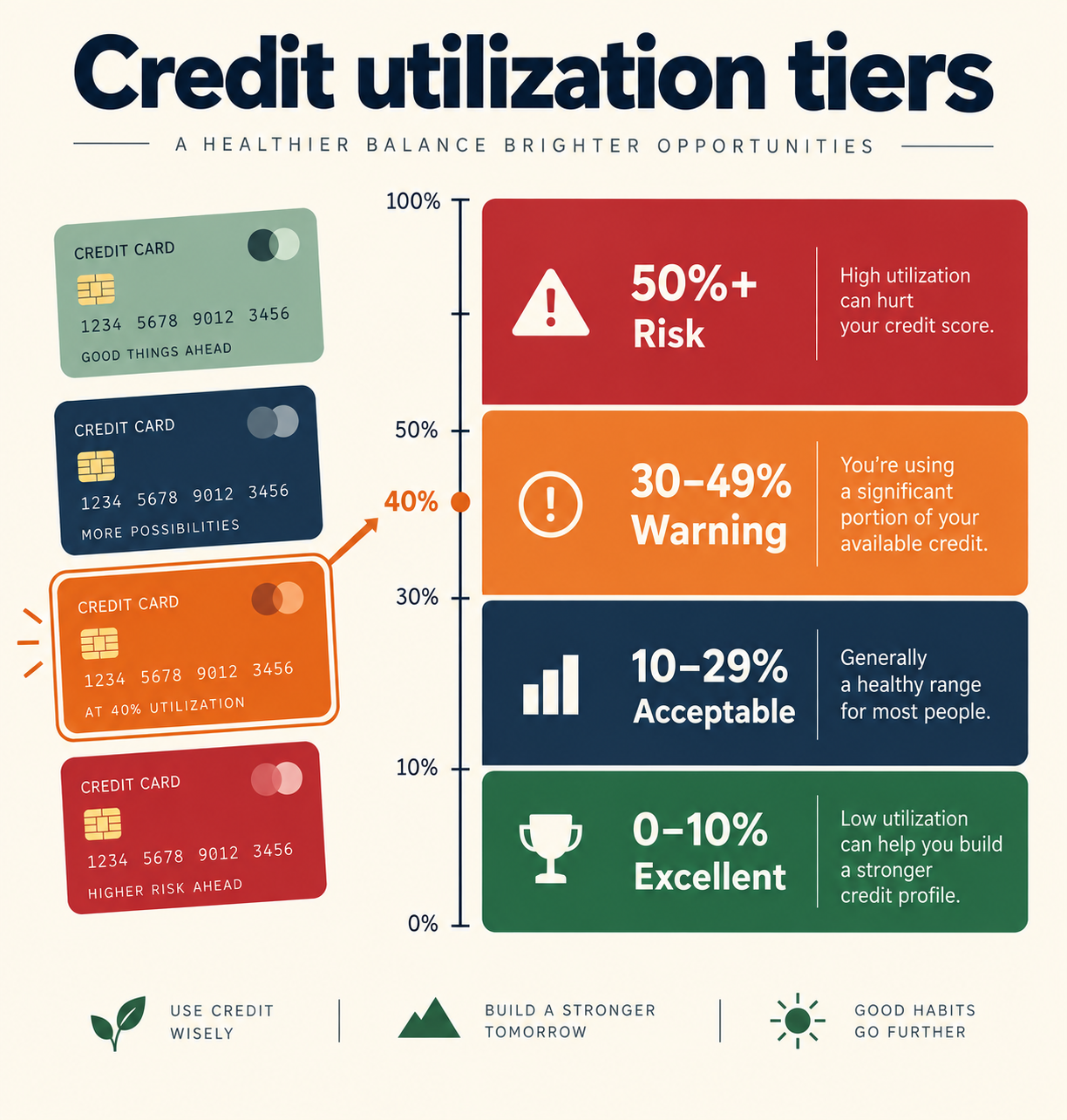
Take a card with a $1,850 balance and a $5,000 limit. The calculator divides 1,850 by 5,000, which is 0.37, then multiplies by 100 to get 37.0%. That lands in the Fair band, because it sits above 30% but below 50%, so the verdict reads that utilization starts dragging the score down.
Now trace what a payment does. Paying $400 drops the balance to $1,450, and 1,450 / 5,000 = 0.29, or 29.0%: just under the 30% ceiling, so the verdict jumps from Fair to Good for a $400 payment. Paying $900 instead drops the balance to $950, and 950 / 5,000 = 19.0%, still Good but with more cushion against a balance that creeps up between statements.
The input validation also follows exact rules. A balance of $60,000 against a $5,000 limit fails the check because the formula rejects any balance above 10x the limit, and a limit of 0 fails because dividing by zero is undefined. Zero balance is allowed and returns 0.0%.
Where the single-card math stops matching your real score
This calculator treats one card's ratio, but FICO scores two utilization numbers: per-card and all-cards-combined. Three cards each at 25% of a $3,000 limit looks identical to one card at 25% here, yet a single card maxed at 100% while two others sit at 0% can still cost points even when the combined ratio is 33% of $9,000 total.
Boundary cases behave differently from the middle of the scale. At exactly 0% some scoring models read an inactive credit line and score it slightly worse than a small 1-3% balance, which is why the excellent band starts below 10% rather than at 0. At exactly 30% you are in the Fair band, since the Good verdict only applies under 30%; $1,500 on a $5,000 limit is 30.0% and Fair, while $1,499 is 29.98% and Good.
Timing matters as much as the ratio. Issuers usually report the statement balance once a month, so a card at 80% all month that you pay to 5% the day after the statement closes still gets reported as 80%. The fix people use is a mid-cycle payment before the statement date, not waiting for the due date. Finally, balances over 10x the limit or negative amounts are rejected rather than clamped, so a refunded balance showing -$40 must be entered as 0.