State paycheck estimator
Wisconsin Paycheck Calculator
Estimate your Wisconsin take-home pay per paycheck: federal tax, FICA, state income tax, plus pre-tax 401(k) and health deductions. Single-filer 2026 model; nothing you enter leaves your browser.
What does this tool do?
Wisconsin Paycheck Calculator computes the result directly in your browser — Estimate your Wisconsin take-home pay per paycheck: federal tax, FICA, state income tax, plus pre-tax 401(k) and health deductions. Single-filer 2026 model; nothing you enter leaves your browser. Nothing you enter is uploaded or stored.
Tax year 2026 · This state's brackets are an unverified planning estimate — they have not been checked against the Wisconsin revenue department's current 2026 withholding tables and may be stale. · Informational, not tax advice.
How a Wisconsin paycheck breaks down
Wisconsin has 3 graduated income-tax brackets (top 6.27%). Federal income tax uses 2026 single-filer brackets with the $16,100 standard deduction; FICA is 6.2% Social Security (up to $184,500 of wages) plus 1.45% Medicare.
Calculator
Estimated take-home per paycheck
-
-
| Line | Per paycheck |
|---|---|
| Gross | - |
| Pre-tax deductions | - |
| Federal income tax | - |
| State income tax | - |
| FICA (SS + Medicare) | - |
Effective combined income-tax rate: -
How the state tax is sliced
| Rate | Taxed slice | Tax |
|---|
Single-filer illustration with the standard deduction; excludes credits, exemptions, retirement catch-ups, and local/city taxes. This state's brackets are an unverified planning estimate — they have not been checked against the Wisconsin revenue department's current 2026 withholding tables and may be stale. Tax year 2026; verify with the Wisconsin revenue department. Not tax advice.
How this estimate works
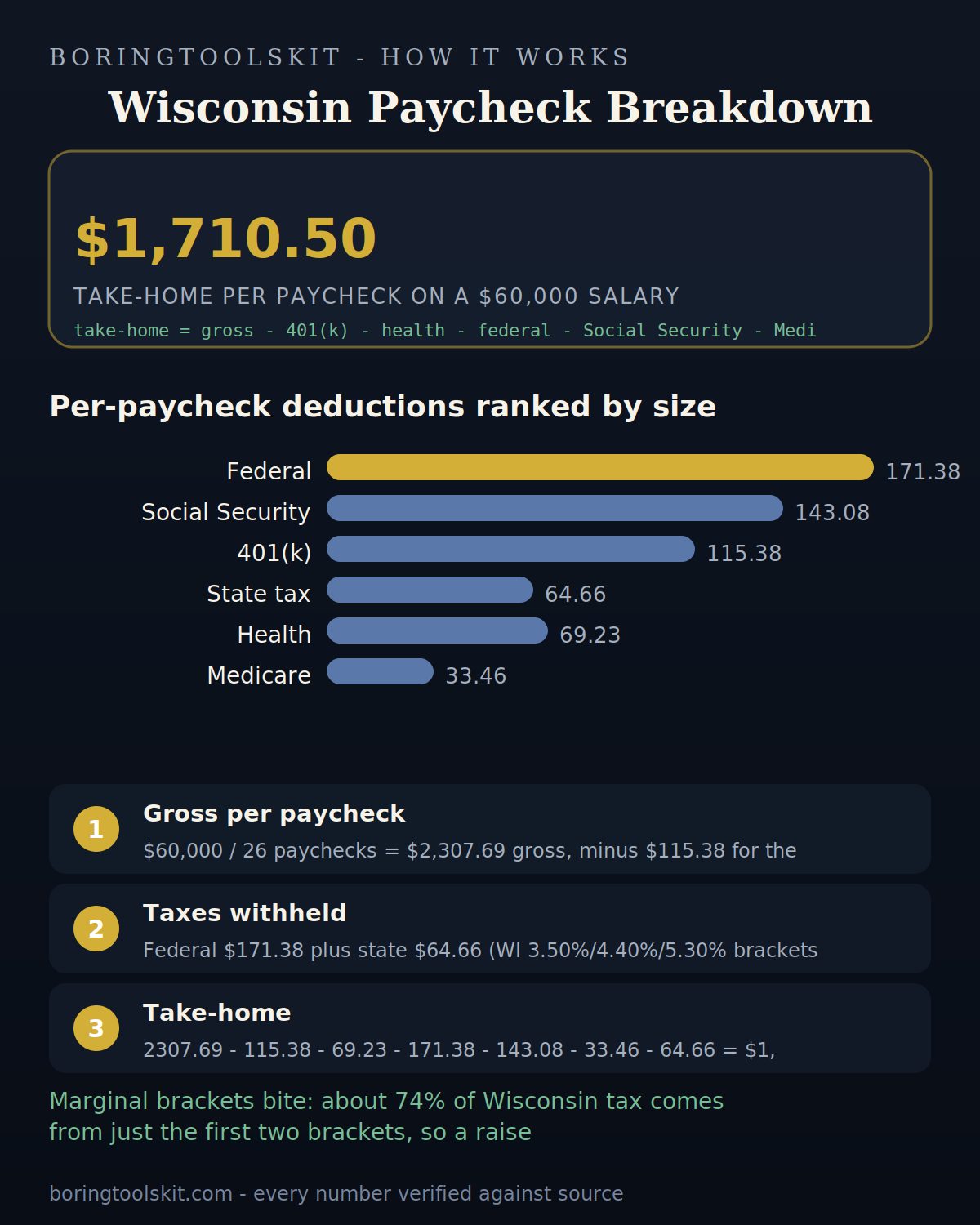
Annual gross minus pre-tax 401(k)/health contributions minus the standard deduction is taxed through the 2026 federal single-filer brackets. Social Security takes 6.2% of gross wages up to $184,500; Medicare takes 1.45% of all wages (0.9% additional above $200,000 single). State income tax applies the Wisconsin table to wages after pre-tax deductions. Everything divides by your pay frequency.
See the full Wisconsin bracket table or the federal paycheck calculator.
How Wisconsin withholding actually gets calculated
Wisconsin is unusual in that its income tax withholding schedule tracks the federal method closely, but it does not copy it. Employers use the federal Form W-4 to determine a Wisconsin allowance figure, then apply the state's own graduated percentage method tables from the current Withholding Tax Guide published by the Department of Revenue. That guide is reissued when rates or brackets change, so a paycheck stub from one year will not necessarily match the same salary in a later year. The calculator applies the graduated structure rather than a single flat rate, which is why two people earning $70,000 can see different estimates if one has chosen a different allowance figure on their W-4.
The brackets are progressive, so withholding is applied slice by slice rather than at one flat rate on every dollar; which specific rate counts as your bracket depends on where your taxable income lands, and a mid-salary earner's pay is usually spread across the middle brackets rather than concentrated in the top one. If your estimate looks high or low, the allowance number you typed is the most common cause, not the bracket math itself. Note this tool models withholding, not final liability: the reconciliation on Form WT-7 (Wisconsin's version of the return reconciliation) happens once a year, and many filers get a small refund or owe a small balance because withholding is intentionally an estimate.
Wisconsin has no local income tax, and what that removes
Wisconsin does not levy a city or county income tax. For most employers this is a genuine simplification: a person earning $85,000 in Milwaukee and a person earning $85,000 in Eau Claire take home the same Wisconsin tax amount, all else equal. States like Ohio (with municipal school district and city levies) or New York (New York City resident surtax) add a layer of local withholding that varies by address; Wisconsin chooses not to.
This does change how the calculator behaves: there is no third income-tax field to fill or estimate. But removal of local tax does not mean removal of local cost, it just means those costs are not charged on your paycheck. The Milwaukee area funds many of its services through property taxes and sales taxes instead, which never touch withholding, and groceries are exempt from sales tax state-wide. For a tool that only estimates the paycheck, the practical consequence is that Wisconsin pay estimates have one fewer source of variation than the same estimate in Minnesota or Ohio. If your personal budget includes a big city property tax cost, that number belongs in a different calculator, not this one.
The most common withholding mistake Wisconsin filers make
The most frequent error is treating the allowance figure on the W-4 as though it were a dollar reduction. On the old W-4 revision each allowance in Wisconsin reduced the amount of wages subject to withholding by roughly the personal exemption amount; on the revised federal form allowances were replaced with dollar-based credits. Employees still mix these up, so a person who wants extra take-home may enter something like '4' into a field expecting credits, and the withholding math produces a very different number than intended.
The consequences are linear, not dramatic: misstating the allowance figure shifts the withholding estimate by a modest amount per pay period, but it compounds over the year. In one scenario a $95,000 earner who accidentally withholds at the credit rate rather than the dollar rate ends up under-withholding about eight to ten dollars a week; that is not enough to trigger an estimated tax penalty by itself, but it shows up as a small balance owed on the annual return. When you use the calculator, treat the allowance input as a pure number from your employer's paperwork, not as something you can adjust freely to force a target take-home. If the result still looks implausible, compare it to your actual stub for one period before assuming the math is wrong.
What this estimate cannot see: your actual employer's payroll setup
Every figure on this page is an estimate keyed to a single salary and a single filing profile. Real paychecks depend on variables the calculator has no access to: whether your employer withholds for state on a calendar-quarter basis or a pay-period basis, whether you are paid on a biweekly or semimonthly cycle (those two are different, and they change the number of withholding periods per year), whether your employer rounds, and what specific versions of the tables your payroll vendor has implemented. Large employers typically use a payroll service that applies the current tables; very small employers may use the percent-of-taxes shortcut on some pay periods.
Additionally, pretax deductions change the base before Wisconsin tax is applied. A person with a $200 per pay period 401(k) contribution and a $150 health premium sees a materially different taxable base than a person earning the same gross with no deductions. The tool lets you model pretax amounts where the input supports it, but it cannot know whether your specific employer counts cafeteria-2125 plan amounts as pretax against Wisconsin tax (they generally are, but a few plan types are not). If your employers' paperwork contradicts the estimate, trust the paperwork; avenues to settle it include asking payroll which version of the withholding tables they use rather than trying to reverse-engineer the math yourself.
How to act on a Wisconsin estimate without a payroll background
First, use the estimate to set a target, not to justify a belief. If the tool says you should take home roughly $2,090 per biweekly period on a $62,000 salary, compare that against what your actual stub shows. If the two differ by more than about five percent, something concrete is off: a wrong allowance figure, a deduction the tool does not model, or your employer using a different table version. That comparison is worth more than any hypothetical benchmark.
Second, use the annual framing for budget decisions. A monthly gross of $5,167 sounds healthy; the after-tax version after federal withholding, FICA, and Wisconsin tax will land closer to $3,700 to $3,900 depending on your deductions. Negotiating a raise, deciding whether a side income items pushes you over an income threshold for a state benefit, or choosing between a pretax and Roth 401(k) contribution are all decisions that should key off the after-tax number, and the after-tax number is what this tool produces.
Third, if you find yourself adjusting inputs repeatedly to make the output match a desired take-home, stop: that is not what the tool is for. The tool tells you what the state and federal schedules produce from your inputs. If the inputs are honest and the output still bothers you, the useful action is a withholding filing adjustment with your employer, not a recalculated estimate.